
This function is available from the 8th expansion stage.
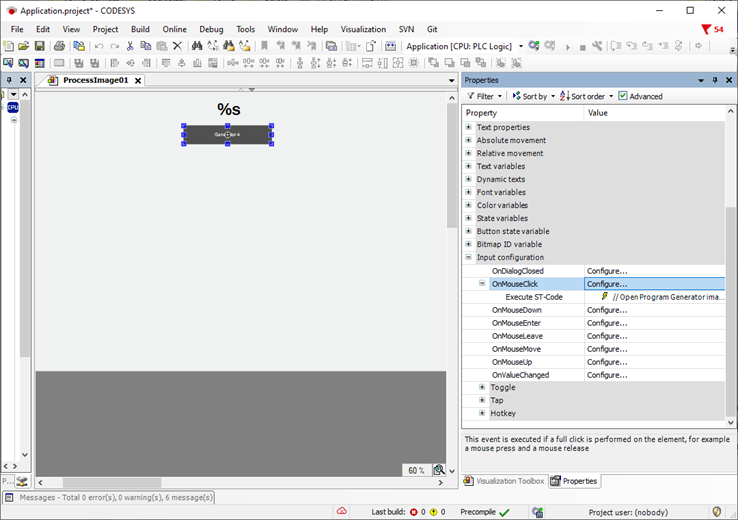
A button object is created in a process screen in this example. The FC_openImage() function can be used in the ST code via the configuration of the OnMouseClick input to switch to a different visualisation.
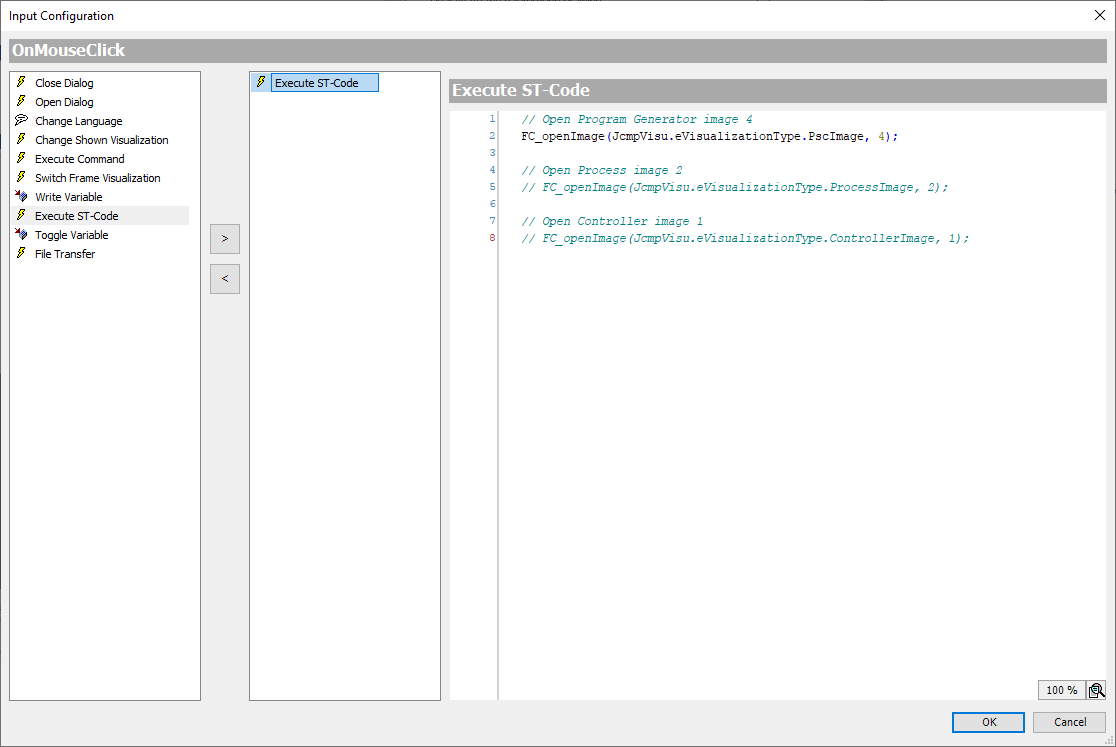
The following examples show in sequence how the change to the visualisation of the fourth program generator, the second process screen and the first controller screen can be implemented.
// Open Program Generator image 4
FC_openImage(JcmpVisu.eVisualizationType.PscImage,4);
// Open Process image 2
FC_openImage(JcmpVisu.eVisualizationType.ProcessImage,2);
// Open Controller image 1
FC_openImage(JcmpVisu.eVisualizationType.ControllerImage,1);
The following visualizations are available:
|
Image |
Enum |
Comment |
|---|---|---|
|
Process image |
ProcessImage |
|
|
Controller |
ControllerImage |
|
|
Controller App |
SoftControllerImage |
|
|
Program generator |
PscImage |
Only Visu-Template |
|
Process Technology |
ProcessTechImage |
Only Process Technology |
|
Chargen |
BatchImage |
Only Process Technology |